
# 残りのフロントエンド実装
フロント側を作成します。React の要素が大きいため、全てを解説しませんが、一度コピー・貼り付けで動かすところまで作成してみましょう。 その後プログラムを見ながら、一部ずつ修正して挙動を確認し、理解を深めてみてください。
# TodoRoot
# TodoRoot.jsx
TodoRoot.jsx の内容を以下のように変更します。
~~/resources/js/components/TodoRoot.jsx
import React from 'react'
import ReactDOM from 'react-dom'
import axios from 'axios'
import { useEffect, useState } from 'react'

import List from './todo/List'
import NewItem from './todo/NewItem'

import style from './TodoRoot.module.css'

function TodoRoot() {
  const [items, setItems] = useState([])

  const fetchItems = async () => {
    try {
      const { headers, data } = await axios.get('/api/todos')
      setItems(data)
      // console.log('request headers', headers)
    } catch (err) {
      console.error('request error', err.request.headers)
    }
  }

  useEffect(() => {
    fetchItems()
  }, [])

  const onUpdated = () => {
    fetchItems()
  }

  return (
    <div className={style.container}>
      <div className={style.row}>
        <h3> Do To </h3>
        <NewItem onUpdated={() => onUpdated()}></NewItem>
        <List items={items} onUpdated={() => onUpdated()}></List>
      </div>
    </div>
  )
}

export default TodoRoot

if (document.getElementById('todo-main')) {
  ReactDOM.render(<TodoRoot />, document.getElementById('todo-main'))
}
2
3
4
5
6
7
8
9
10
11
12
13
14
15
16
17
18
19
20
21
22
23
24
25
26
27
28
29
30
31
32
33
34
35
36
37
38
39
40
41
42
43
44
45
46
47
# TodoRoot.module.css
TodoRoot.module.css という名前のファイルを作成し、以下の内容を追記します。
~~/resources/js/components/TodoRoot.module.css
.container {
  max-width: 800px;
  margin: 0 auto;
}

.row {
  display: flex;
  flex-direction: column;
  row-gap: 16px;
}
2
3
4
5
6
7
8
9
10
# Item
# Item.jsx
Item.jsx という名前のファイルを作成し、以下の内容を追記します。
~~/resources/js/components/todo/Item.jsx
import React from 'react'
import axios from 'axios'
import { useEffect, useState } from 'react'

import style from './Item.module.css'

function Item({
  id,
  userId,
  title,
  isDone,
  createdAt,
  updatedAt,
  onUpdated,
  onDeleted,
}) {
  const deleteItem = async (id) => {
    try {
      const isDelete = confirm('削除しますか?')
      if (isDelete) {
        const { data } = await axios.delete('/api/todos/' + id)
        if (onDeleted) {
          onDeleted()
        }
      }
    } catch (err) {
      alert(
        `エラーが発生しました。 ${err?.message || 'Unknown Error'}, ${
          err?.response?.statusText || 'No server Message'
        }`
      )
      console.error('Error message:', err?.message)
      console.error('Error response:', err?.response)
    }
  }

  const updateDone = async (id, toDone) => {
    try {
      const toDoneUrl = toDone ? '/done' : '/undone'
      const { data } = await axios.patch('/api/todos/' + id + toDoneUrl)
      if (onUpdated) {
        onUpdated()
      }
    } catch (err) {
      alert(
        `エラーが発生しました。 ${err?.message || 'Unknown Error'}, ${
          err?.response?.statusText || 'No server Message'
        }`
      )
      console.error('Error message:', err?.message)
      console.error('Error response:', err?.response)
    }
  }

  return (
    <div>
      <div className={style.rowCover}>
        <input
          id={'todo-item-' + id}
          type="checkbox"
          disabled
          checked={isDone ? 'checked' : ''}
        />
        <label
          htmlFor={'todo-item-' + id}
          className={style.myCheckbox}
          onClick={() => updateDone(id, !isDone)}
        ></label>
        <div className={isDone ? style.complete : ''}>
          {title.split('\n').map((line, index) => (
            <span key={index}>
              {line} <br />
            </span>
          ))}
        </div>
      </div>
      <div className={style.rowSubMessage}>
        <span>作成日時: {createdAt}</span>/<span>更新日時: {updatedAt}</span>
      </div>

      <div className={style.coverButton}>
        <div className={style.spacer}></div>
        <button className={style.deleteButton} onClick={() => deleteItem(id)}>
          削除
        </button>
      </div>
    </div>
  )
}

export default Item
2
3
4
5
6
7
8
9
10
11
12
13
14
15
16
17
18
19
20
21
22
23
24
25
26
27
28
29
30
31
32
33
34
35
36
37
38
39
40
41
42
43
44
45
46
47
48
49
50
51
52
53
54
55
56
57
58
59
60
61
62
63
64
65
66
67
68
69
70
71
72
73
74
75
76
77
78
79
80
81
82
83
84
85
86
87
88
89
90
91
# Item.module.css
Item.module.css という名前のファイルを作成し、以下の内容を追記します。
~~/resources/js/components/todo/Item.module.css
.coverButton {
  padding: 10px;
  display: flex;
  flex-direction: row;
}

.spacer {
  flex-grow: 1;
}

.rowCover {
  display: flex;
}

.rowSubMessage {
  font-size: 12px;
  line-height: 1.2em;
  color: #666;
}

input[type='checkbox'] {
  display: none;
}

.deleteButton {
  appearance: none;
  -webkit-appearance: none;
  -moz-appearance: none;
  border: none;
  cursor: pointer;
  outline: none;
  padding: 0 10px;
  border-radius: 10px;
  background-color: transparent;
  color: rgb(90, 8, 31);
}
.deleteButton:hover {
  background-color: rgba(0, 0, 0, 0.1);
}

.editButton {
  appearance: none;
  -webkit-appearance: none;
  -moz-appearance: none;
  border: none;
  cursor: pointer;
  outline: none;
  padding: 0 10px;
  border-radius: 10px;
  color: rgb(31, 41, 55);
  background-color: transparent;
}
.editButton:hover {
  background-color: rgba(0, 0, 0, 0.1);
}

.complete {
  text-decoration: line-through double;
}

.myCheckbox {
  box-sizing: border-box;
  padding: 5px 20px;
  position: relative;
  display: inline;
  width: auto;
  cursor: pointer;
}

.myCheckbox::before {
  background: #fff;
  border: 1px solid #ccc;
  border-radius: 3px;
  content: '';
  display: block;
  height: 16px;
  left: 5px;
  margin-top: -8px;
  position: absolute;
  top: 50%;
  width: 16px;
}

.myCheckbox::after {
  border-right: 6px solid #00cccc;
  border-bottom: 3px solid #00cccc;
  content: '';
  display: block;
  height: 24px;
  left: 10px;
  margin-top: -16px;
  opacity: 0;
  position: absolute;
  top: 50%;
  transform: rotate(45deg);
  width: 9px;
}

input[type='checkbox']:checked + .myCheckbox::before {
  border-color: #666;
}

input[type='checkbox']:checked + .myCheckbox::after {
  opacity: 1;
}
2
3
4
5
6
7
8
9
10
11
12
13
14
15
16
17
18
19
20
21
22
23
24
25
26
27
28
29
30
31
32
33
34
35
36
37
38
39
40
41
42
43
44
45
46
47
48
49
50
51
52
53
54
55
56
57
58
59
60
61
62
63
64
65
66
67
68
69
70
71
72
73
74
75
76
77
78
79
80
81
82
83
84
85
86
87
88
89
90
91
92
93
94
95
96
97
98
99
100
101
102
103
104
105
# List
# List.jsx
List.jsx の内容を以下のように変更します。
~~/resources/js/components/todo/List.jsx
import React from 'react'

import Item from './Item'
import style from './List.module.css'

function List({ items, onUpdated }) {
  const contents = items.map((item, index) => (
    <div key={item.id}>
      {index !== 0 ? <hr className={style.boarder} /> : <></>}
      <Item
        id={item.id}
        userId={item.user_id}
        isDone={item.is_done}
        title={item.title}
        createdAt={item.created_at}
        updatedAt={item.updated_at}
        onUpdated={() => {
          onUpdated()
        }}
        onDeleted={() => {
          onUpdated()
        }}
      />
    </div>
  ))

  return (
    <>
      <div className={style.cover}>
        <div className={style.coverTitle}>一覧</div>
        <div className={style.coverList}>
          {contents}
          {items.length == 0 ? 'アイテムなし' : ''}
        </div>
      </div>
    </>
  )
}

export default List
2
3
4
5
6
7
8
9
10
11
12
13
14
15
16
17
18
19
20
21
22
23
24
25
26
27
28
29
30
31
32
33
34
35
36
37
38
39
40
# List.module.css
List.module.css という名前のファイルを作成し、以下の内容を追記します。
~~/resources/js/components/todo/List.module.css
.cover {
  border-radius: 10px;
  overflow: hidden;
  box-shadow: rgba(0, 0, 0, 0.24) 0px 3px 8px;
  background-color: white;
}

.coverTitle {
  padding-top: 10px;
  padding-right: 10px;
  padding-left: 10px;
  font-weight: 600;
}

.coverList {
  padding: 10px;
}

.boarder {
  margin: 0;
}
2
3
4
5
6
7
8
9
10
11
12
13
14
15
16
17
18
19
20
21
# NewItem
# NewItem.jsx
NewItem.jsx という名前のファイルを作成し、以下の内容を追記します。
~~/resources/js/components/todo/NewItem.jsx
import React from 'react'
import axios from 'axios'
import { useEffect, useState } from 'react'

import style from './NewItem.module.css'

function NewItem({ onUpdated }) {
  const [todoContents, setTodoContents] = useState('')

  const createItem = async function (todoContents) {
    try {
      const { data } = await axios.post('/api/todos', {
        'item-contents': todoContents,
      })
      setTodoContents('')
      if (onUpdated) {
        onUpdated()
      }
    } catch (err) {
      alert(
        `エラーが発生しました。 ${err?.message || 'Unknown Error'}, ${
          err?.response?.statusText || 'No server Message'
        }`
      )
      console.error('Error message:', err?.message)
      console.error('Error response:', err?.response)
    }
  }

  return (
    <>
      <div className={style.cover}>
        <div className={style.coverTitle}>新規登録</div>
        <div className={style.coverInput}>
          <textarea
            className={style.input}
            value={todoContents}
            onChange={(v) => {
              setTodoContents(v.target.value)
            }}
          />
        </div>
        <div className={style.coverButton}>
          <button
            className={style.button}
            onClick={() => createItem(todoContents)}
          >
            登録
          </button>
        </div>
      </div>
    </>
  )
}

export default NewItem
2
3
4
5
6
7
8
9
10
11
12
13
14
15
16
17
18
19
20
21
22
23
24
25
26
27
28
29
30
31
32
33
34
35
36
37
38
39
40
41
42
43
44
45
46
47
48
49
50
51
52
53
54
55
56
# NewItem.module.css
NewItem.module.css という名前のファイルを作成し、以下の内容を追記します。
~~/resources/js/components/todo/NewItem.module.css
.cover {
  border-radius: 10px;
  overflow: hidden;
  box-shadow: rgba(0, 0, 0, 0.24) 0px 3px 8px;
  background-color: white;
}

.coverTitle {
  padding-top: 10px;
  padding-right: 10px;
  padding-left: 10px;
  font-weight: 600;
}

.coverInput {
  padding: 10px;
}

.coverButton {
  padding: 10px;
  background-color: rgb(226, 227, 228);
  display: flex;
  flex-direction: row-reverse;
}

.input {
  box-sizing: border-box;
  padding: 10px 15px;
  border-radius: 10px;
  color: #8d8d8d;
  width: 100%;
  height: 100px;
}

.button {
  appearance: none;
  -webkit-appearance: none;
  -moz-appearance: none;
  border: none;
  cursor: pointer;
  outline: none;
  padding: 6px 10px;
  border-radius: 5px;
  min-width: 80px;
  background-color: rgb(31, 41, 55);
  color: white;
}
2
3
4
5
6
7
8
9
10
11
12
13
14
15
16
17
18
19
20
21
22
23
24
25
26
27
28
29
30
31
32
33
34
35
36
37
38
39
40
41
42
43
44
45
46
47
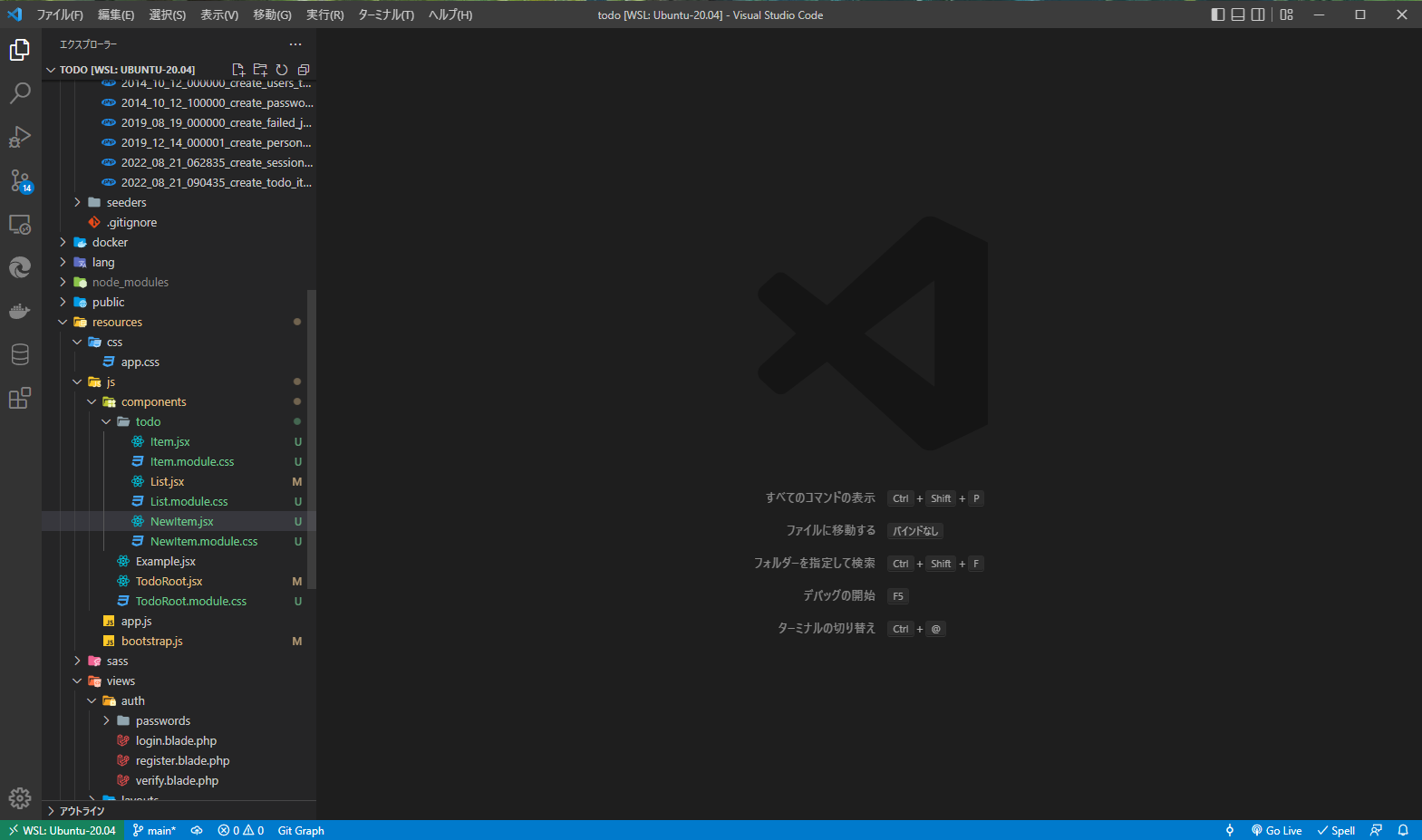
ファイル構造は以下のようになります。
← 残りのバックエンド実装 最終状態と発展 →